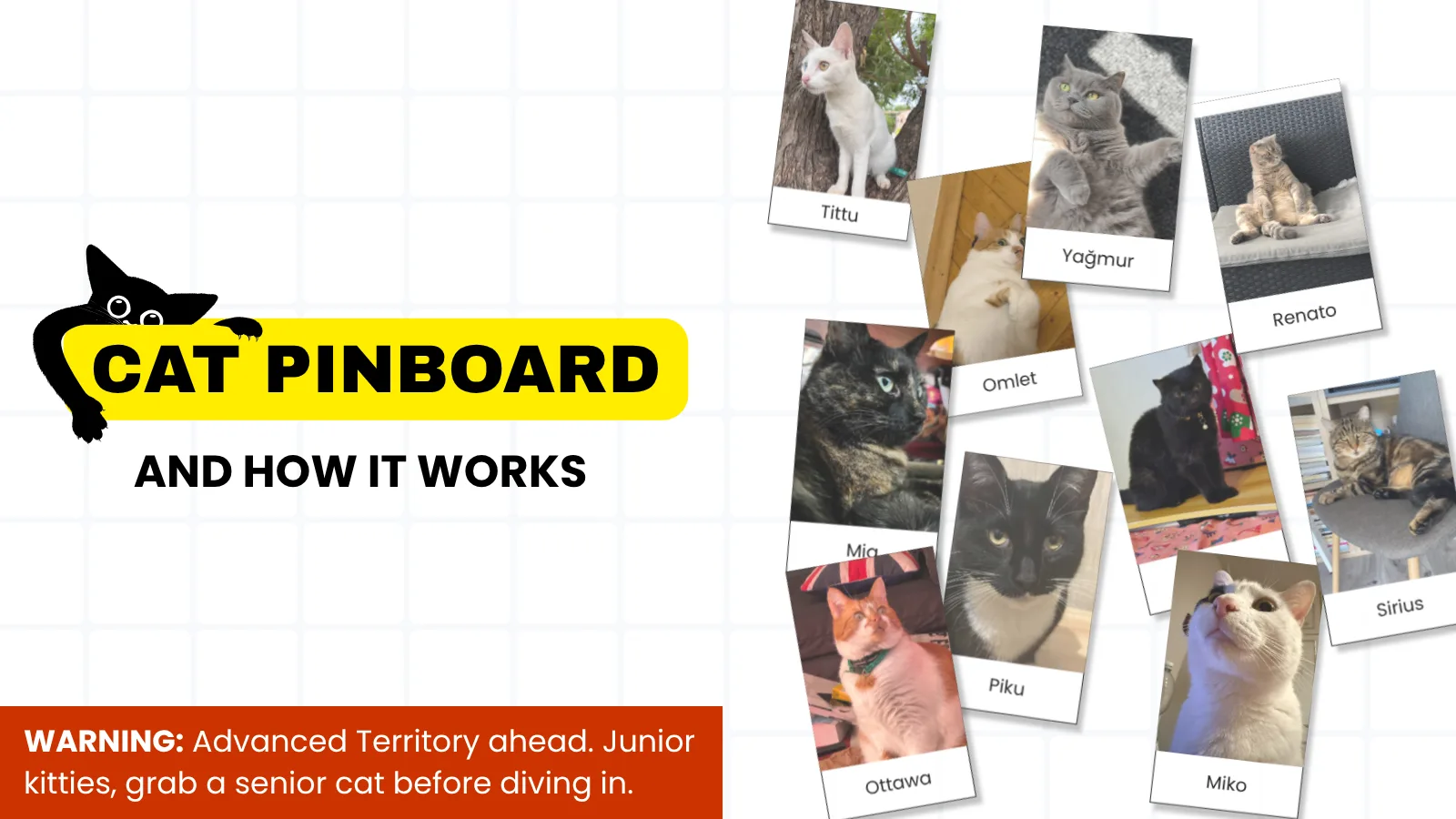
Scroll down the homepage and you will hit a cork board full of cats. This post covers how the pinboard actually works: the front-end canvas, the backend checks, and the nightly jobs that keep the board tidy.
First of all, why?
The whole channel is about cats and code, so leaving cats off the website felt wrong. I'm a cat person, and I know how much everyone loves taking pictures of their cats and sharing it, basically, everywhere. I wanted my audience to be able to do the same thing here, in public. So I built a board where anyone can stick a photo of their cat and leave it up for good. Pin your cat and it stays here, a little sign that your cat passed through.
The rest of this post is how I put that together.
How the whole thing fits together
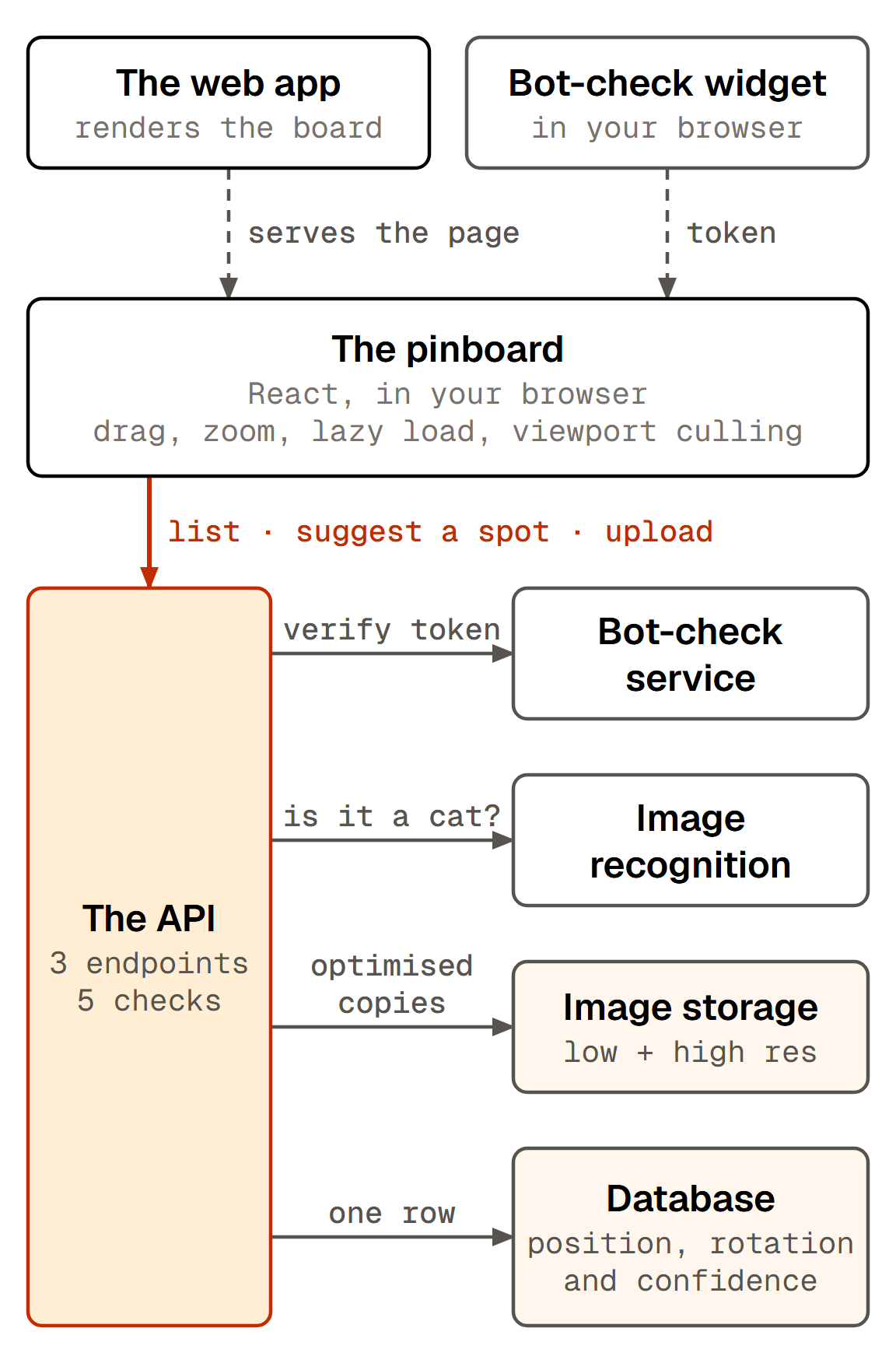
The pinboard runs as two systems: a web app that serves the page and renders the board, and an API that does the validating and holds the data. The browser calls the API directly across three endpoints. The API hands a couple of the checks off to managed services, one for the bot check and one for image recognition. The list endpoint returns the whole board in one array, with no pagination. A few hundred rows of coordinates is nothing, and having it all client-side keeps search and culling cheap.
The board's way bigger than your screen
The board is one absolutely-positioned div of 8,000 × 4,500 px, big enough that
a 4K screen in fullscreen still has room to pan. Every polaroid sits inside
it at a plain left/top in board pixels and never moves again. The viewport
renders the whole thing with a single transform, translate(pan) scale(zoom)
with origin top-left, so panning and zooming is one composited transform rather
than several hundred layout changes. One formula converts between screen and
board coordinates:
// screen = pan + virtual × zoom, inverted:
const virtualX = (screenX - pan.x) / zoom;
const virtualY = (screenY - pan.y) / zoom;
Zoom-to-cursor, centring on a new upload, and search jumps are all this equation solved for a different variable.
The decisions I made for performance:
- Lazy loading: an IntersectionObserver starts the fetch 200px before the section scrolls into view, so the homepage never pays for a section you may not reach.
- Viewport culling: photos more than 500px outside the viewport are skipped entirely; each rendered polaroid then lazy-loads its own image through a second observer with a tighter 100px margin. The board keeps a set of the ids that have already decoded, so a photo you pan away from and back to reappears instantly instead of flashing a spinner.
- Clamped navigation: panning is clamped so the canvas can't be dragged off-screen, boundary indicators flash at the edges, and zoom runs 0.4×–3× with haptic feedback where supported.
- Click vs drag: movement beyond 5px counts as a pan, not a click. A double-click (two taps inside 500ms) opens the full-size photo.
Every photo sits at a fixed 192 × 250 px and gets a server-assigned rotation between −5° and +5°, stored alongside its coordinates so the tilt is the same every time you load the page.
So what happens when you upload?
You pick a photo
Name, file and a bot-check token.
The browser asks for a spot
The API suggests one near where you're looking.
The API runs the checks
Five validations, in order.
Pinned
Two optimised copies in storage, one row in the database.
Most of that is plumbing. The checks are the part I want to walk through.
Five hoops every cat has to jump through
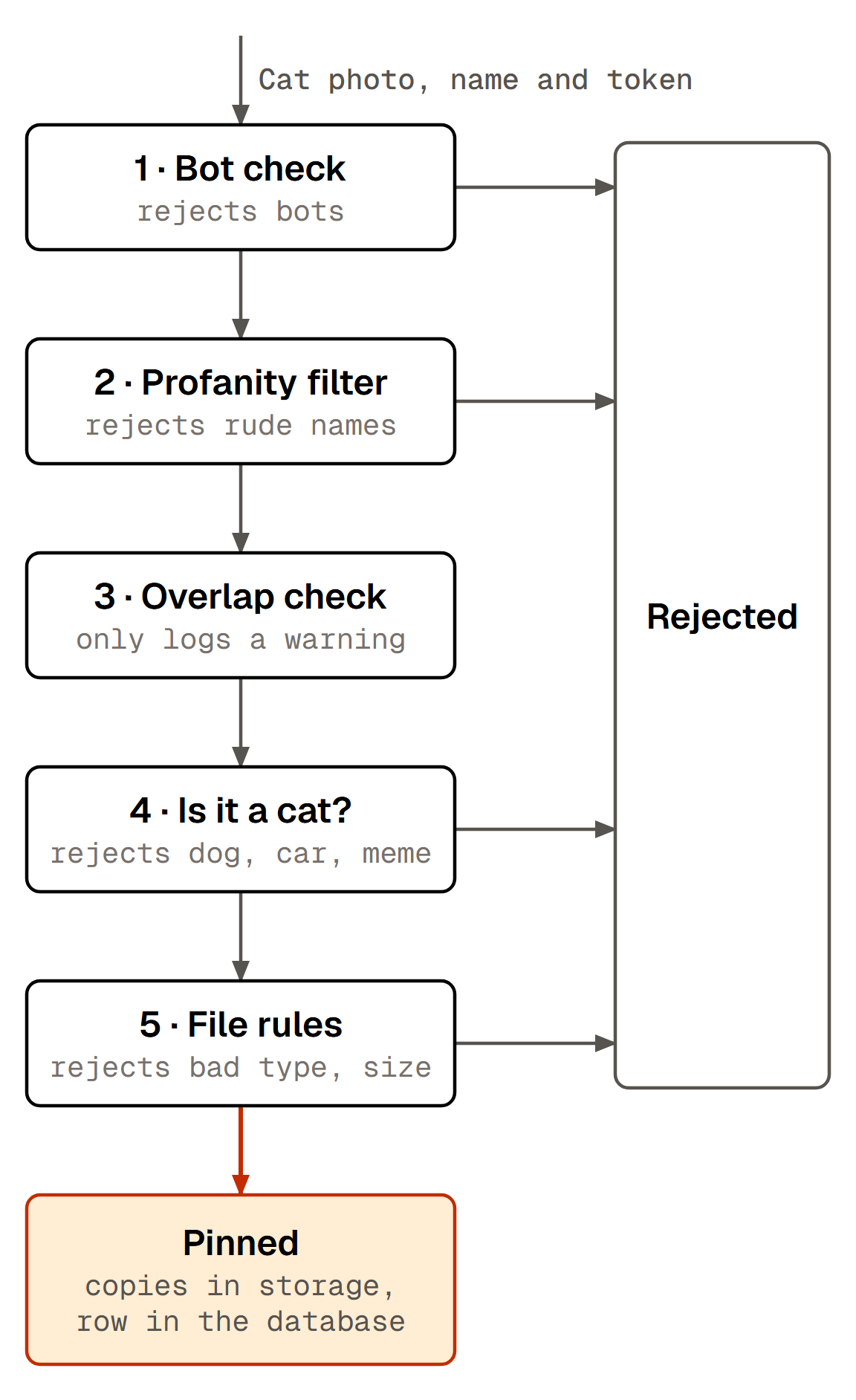
Per check:
- Bot check: the modal runs an invisible challenge in the background; the API verifies the resulting token with a managed bot-check service before the upload handler even runs. A bot gets turned away before its photo is ever read.
- Profanity filter: the cat name goes through a word list, normalised a few different ways first so the obvious dodges (creative spacing, punctuation, letters swapped for lookalike numbers) don't sail straight through. I'll keep the exact details to myself.
- Overlap: If there were no positions found and the image overlaps, the API still accepts it but logs a warning. I decided a crowded board beats rejecting someone's cat.
- Cat check: a managed image-recognition service looks at the photo and reports how confident it is that there's actually a cat in it; below the threshold, the upload is turned away. I'm not spelling out the model, the exact tags or the cut-off.
- File rules: the API accepts only common image formats, and only up to a sensible size cap. It enforces both the type and the size in more than one place, so a hand-crafted request can't slip past the browser-side checks.
Where does a new cat end up?
Before uploading, the browser asks the API for a position. It passes the centre of your viewport, translated into board coordinates with the formula above. That call reserves nothing: the answer is a suggestion, and the browser hands it straight back with the file.
The API's position logic works in phases:
- Phase 1, near the viewport: up to 50 candidates around that centre. Each one is a polar offset, random angle and a random distance inside a 400px radius, then clamped 100px clear of the board edge.
- Each candidate is scored against every pinned photo with the overlap function in the next section. The first one under the limit wins, plus a random rotation.
- Phase 2, the whole board: if nothing near you passed, up to 100 more candidates anywhere on the canvas.
- Fallback: if all 150 fail, the lowest-overlap candidate wins and the API logs a warning. I added Phase 1 so a new photo lands near whatever you were looking at, not just anywhere it happens to fit.
Watch the server find a spot
12 cats already live here. Find somewhere for yours.
The maths behind it all
Every placement decision rests on one rectangle-intersection calculation:
var intersectLeft   = Math.Max(aLeft, bLeft);
var intersectRight  = Math.Min(aRight, bRight);
var intersectTop    = Math.Max(aTop, bTop);
var intersectBottom = Math.Min(aBottom, bBottom);

if (intersectRight <= intersectLeft || intersectBottom <= intersectTop)
    return 0; // not touching at all

var overlapArea = (intersectRight - intersectLeft)
                * (intersectBottom - intersectTop);
var percent = (double)overlapArea / photoArea * 100;
Every photo shares the same size, so the divisor is constant and the ratio reads the same in either direction. It also treats each photo as an upright 192 × 250 box and ignores the tilt, which at ±5° is close enough to be worth the simplicity. I settled on 30% for uploads: roughly one corner tucked behind another photo, layered but still readable. Try it:
Try the overlap check
Spot acceptedYour cat
0%
limit 30%
Under 30% — this spot would be accepted.
The same function runs in three places: position generation, upload-time validation, and the nightly job below.
It doesn't end once your cat is on the board
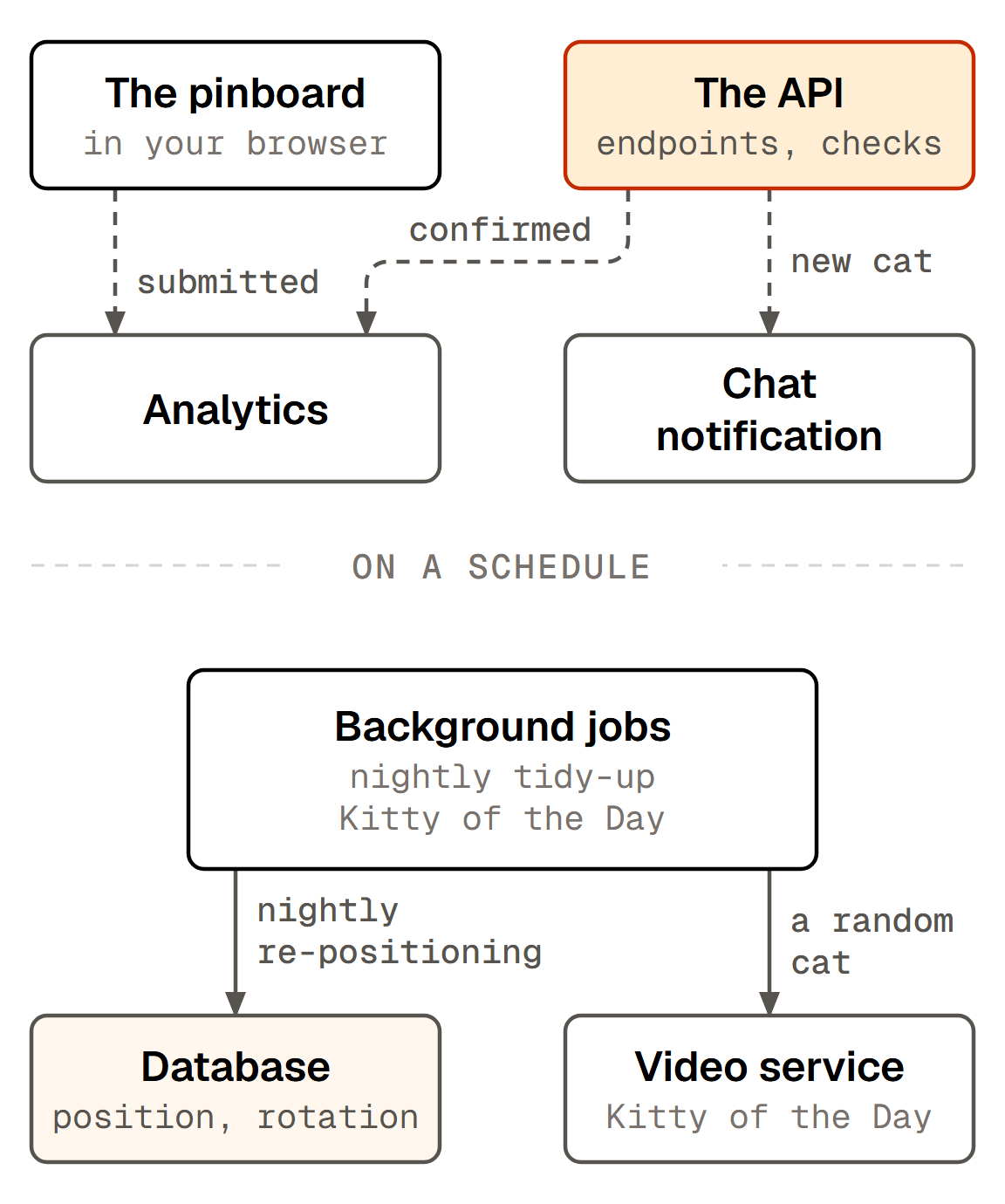
Uploads accept 30% overlap, so at 03:00 UTC a scheduled job re-checks every pair on the board against a stricter 15%:
- The job works oldest first; the older photo keeps its spot, the newer one moves.
- New positions come from a sunflower spiral around the original spot. Attempt n sits at 137.5° × n (the golden angle) and 80px × √n out, which fans candidates outwards at an even density instead of clumping them near the centre. No randomness anywhere in it, so a given board always untangles the same way.
- A photo only moves if the new spot is better than the one it has. Photos that have drifted outside the border padding move regardless: getting off the edge beats a tidy fit.
- Before it changes anything, the job snapshots every position on the board to a backup row, so a bad run can be rolled back in one go.
A few bits and bobs
- Two AVIF copies per upload: 400px for the board, 1,200px for the lightbox, re-encoded through libvips at different quality settings. The board only shows 192px, so 400 covers a retina screen; neither copy is ever upscaled past the original. Both land under a random object key with a year-long immutable cache header, and stripping EXIF falls out of the re-encode, so uploaded photos don't leak GPS data.
- Chat notification on upload, fire-and-forget. It stays off the response path, so a slow notification never delays the upload.
- A funnel, for free: the browser captures "cat photo upload submitted" and the API captures "cat photo uploaded" once the checks pass; the pair measures drop-off through the gauntlet.
- The board feeds other features. The hero counter reads a small stats endpoint; the Kitty of the Day job picks a random cat that hasn't had a video yet and stamps the row once it has, so it works through the board rather than repeating favourites.
- Post-upload UX: the board pans to centre the new photo and animates it in: scale 0, rotated −180°, springing to its final tilt.
Alright, go pin your cat
That is the whole thing I built: one virtual canvas, three endpoints, five checks, one rectangle formula, and a nightly job. The best way to see it work is to put your own cat on it.
The board has room
Five checks, rectangle maths and a nightly tidy-up, with room for one more cat.